xboard
272dbd2107
xboard
272dbd2107
- Add system log cleanup functionality with batch processing
- Optimize v2_settings table performance by unifying value storage
- Add comprehensive client support list for one-click subscription
- Fix QR code subscription links for specific node types
- Fix route addition issues in admin management panel
- Enhance admin system controller with log management APIs
Xboard



📖 Introduction
Xboard is a modern panel system built on Laravel 11, focusing on providing a clean and efficient user experience.
✨ Features
- 🚀 Built with Laravel 11 + Octane for significant performance gains
- 🎨 Redesigned admin interface (React + Shadcn UI)
- 📱 Modern user frontend (Vue3 + TypeScript)
- 🐳 Ready-to-use Docker deployment solution
- 🎯 Optimized system architecture for better maintainability
🚀 Quick Start
git clone -b compose --depth 1 https://github.com/cedar2025/Xboard && \
cd Xboard && \
docker compose run -it --rm \
    -e ENABLE_SQLITE=true \
    -e ENABLE_REDIS=true \
    -e ADMIN_ACCOUNT=admin@demo.com \
    web php artisan xboard:install && \
docker compose up -d
After installation, visit: http://SERVER_IP:7001
⚠️ Make sure to save the admin credentials shown during installation
📖 Documentation
🔄 Upgrade Notice
🚨 Important: This version involves significant changes. Please strictly follow the upgrade documentation and backup your database before upgrading. Note that upgrading and migration are different processes, do not confuse them.
Deployment Guides
- Deploy with 1Panel
- Deploy with Docker Compose
- Deploy with aaPanel
- Deploy with aaPanel + Docker (Recommended)
Migration Guides
- Migrate from v2board dev
- Migrate from v2board 1.7.4
- Migrate from v2board 1.7.3
- Migrate from v2board wyx2685
🛠️ Tech Stack
- Backend: Laravel 11 + Octane
- Admin Panel: React + Shadcn UI + TailwindCSS
- User Frontend: Vue3 + TypeScript + NaiveUI
- Deployment: Docker + Docker Compose
- Caching: Redis + Octane Cache
📷 Preview


⚠️ Disclaimer
This project is for learning and communication purposes only. Users are responsible for any consequences of using this project.
🌟 Maintenance Notice
This project is currently under light maintenance. We will:
- Fix critical bugs and security issues
- Review and merge important pull requests
- Provide necessary updates for compatibility
However, new feature development may be limited.
🔔 Important Notes
- Restart required after modifying admin path:
docker compose restart
- For aaPanel installations, restart the Octane daemon process
🤝 Contributing
Issues and Pull Requests are welcome to help improve the project.
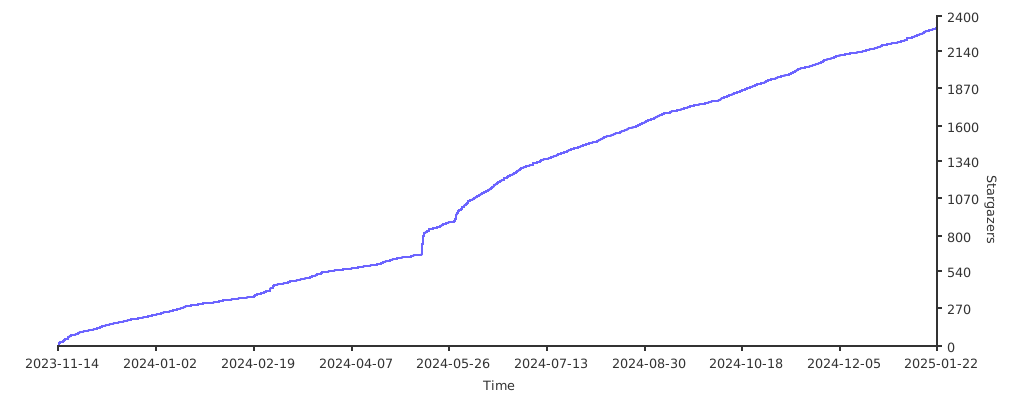
📈 Star History